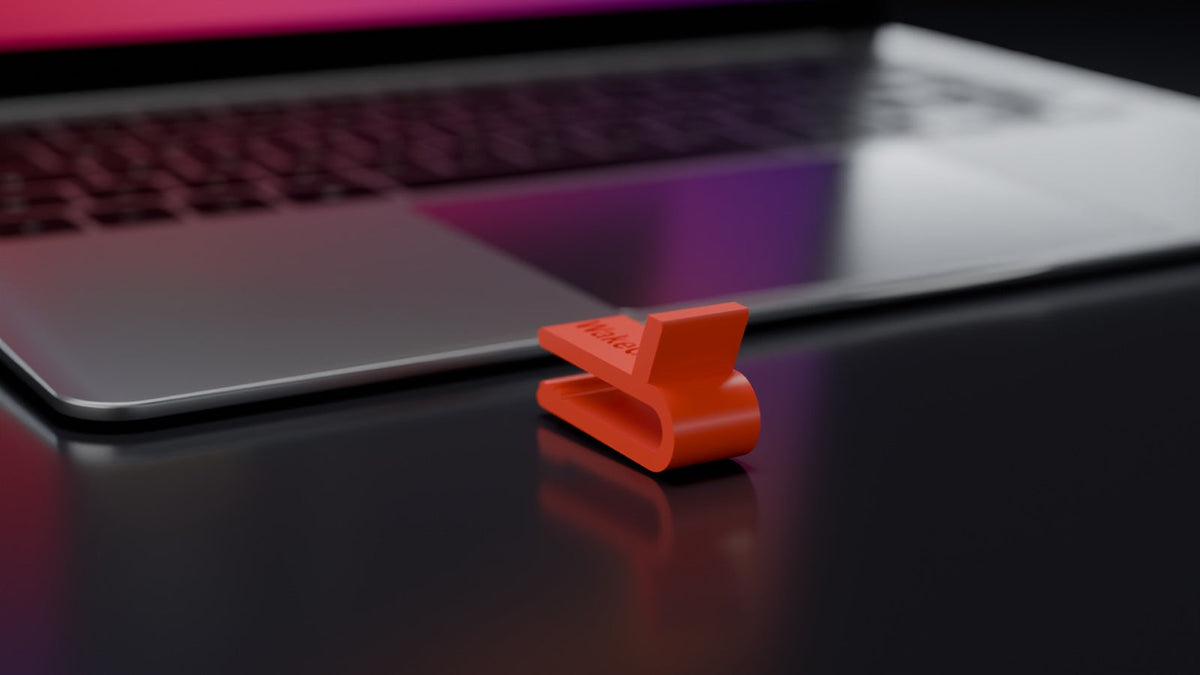
You can, as long as the MacBook stays awake on the way: carry it with the lid open, lower the lid onto a spacer, or switch off sleep from closing the lid. If you close the lid fully, a MacBook without an external display goes to sleep, and the task stops.
Apple lists closing the display as a way to put a Mac laptop to sleep (Put your Mac to sleep or wake it). No normal setting prevents this.
What are the ways?
| Way | Lid | What you need | What to watch |
|---|---|---|---|
| Carry it with the lid open | Open | Nothing | Hold it by the base |
| Lower the lid onto a spacer, for example WakeClip, a clip for the MacBook lid | 12 mm open | The clip for your model | Made for carrying in your hand, not for the bag. |
sudo pmset -a disablesleep 1 |
Fully closed | Terminal, admin rights | Reset it afterwards with sudo pmset -a disablesleep 0
|
| Amphetamine and similar apps | Fully closed | Installation | Not every app works with the lid closed |
| Run the task in the cloud or on a desktop computer | Any | Setup there | Your files have to be available there |
The comparison of all ways also covers an external display and an HDMI dummy plug.
Carry it with the lid open
This needs nothing. The lid does not close, so there is no sleep from closing it.
Lower the lid onto a spacer
WakeClip keeps the lid 12 mm open. Your MacBook does not go to sleep from closing the lid, and whatever is running keeps running.
Slide the clip onto the front edge of the case, to the left of the trackpad, and lower the lid onto it. Two clips, left and right, hold the lid more steadily than one. If you close the lid out of habit, it stops at the clip. No installation, no admin rights, nothing to reset later. Unlike a fully closed lid, there is air above the keyboard, so heat can escape.
Made for carrying in your hand, not for the bag. Pressure on the resting lid strains the display. Other spacers and print-it-yourself files exist too. WakeClip comes in 28 versions, one per MacBook model. The page on WakeClip fit shows how to find yours.
Switch off sleep from closing the lid
A fully shut lid needs a change to the system.
The pmset command
The Terminal command sudo pmset -a disablesleep 1 switches sleep off system-wide, including when the lid closes. It needs admin rights. Apple does not list disablesleep in the manual page man pmset. Reset it with sudo pmset -a disablesleep 0 after carrying, otherwise the Mac also stays awake in your bag. More in caffeinate, pmset and the lid.
Amphetamine
Amphetamine keeps the Mac awake, and its App Store description also lists keeping a MacBook awake while the lid is closed. The lid is then fully shut. According to the version notes, plugging in or unplugging the power adapter can disrupt such a session on MacBooks with Apple silicon, for example when you unplug the MacBook to carry it. For this, the developer offers Power Protect as a separate download. According to the Power Protect instructions, its installer asks for Touch ID or an administrator password.
Run the task somewhere else
If the MacBook goes into a bag, the task belongs on another computer. Anthropic says cloud scheduled tasks in Claude Code keep working when your laptop is closed. OpenAI says tasks in Codex Cloud can keep working while your computer is asleep. Anything that should run overnight without you is better placed on a server or a desktop computer. More in running an AI agent overnight.
What to watch while you carry it
- Grip. Hold the MacBook by the base. Do not press on the lid or put anything on it.
- Wi-Fi. If you carry the MacBook out of Wi-Fi range, it loses the connection. That can interrupt a task whether the Mac is awake or not. Stay in range.
-
Battery and power adapter. On the way, the MacBook runs on battery. The option "Prevent automatic sleeping on power adapter when the display is off" applies, as its name says, only on the power adapter (Set sleep and wake settings for your Mac). Idle sleep is still handled by the Mac's settings or the running program. If the program does not keep the Mac awake,
caffeinate -ihelps.caffeinate -sdoes not help on the way: according toman caffeinate, it only applies on AC power. For long tasks, plug in again when you arrive. - Ventilation. If your MacBook has vents, keep them clear. When you arrive, put it on a stable surface with good ventilation. Apple advises against using it in bed, on a pillow or under bedding (operating temperature of Mac laptops).
- Bag and sleeve. A working MacBook does not belong in a bag or sleeve.
Before you pack it away
- Check that the task has finished or may be stopped.
- Take the clip off and close the MacBook normally.
- If you set
disablesleep 1, reset it withsudo pmset -a disablesleep 0. End any running Amphetamine session.
For long runs with an AI agent, see Claude Code stops when you close your MacBook. If a lowered lid suits you, choose the WakeClip version for your MacBook model. WakeClip is an independent accessory and is not affiliated with Apple, Anthropic or OpenAI.