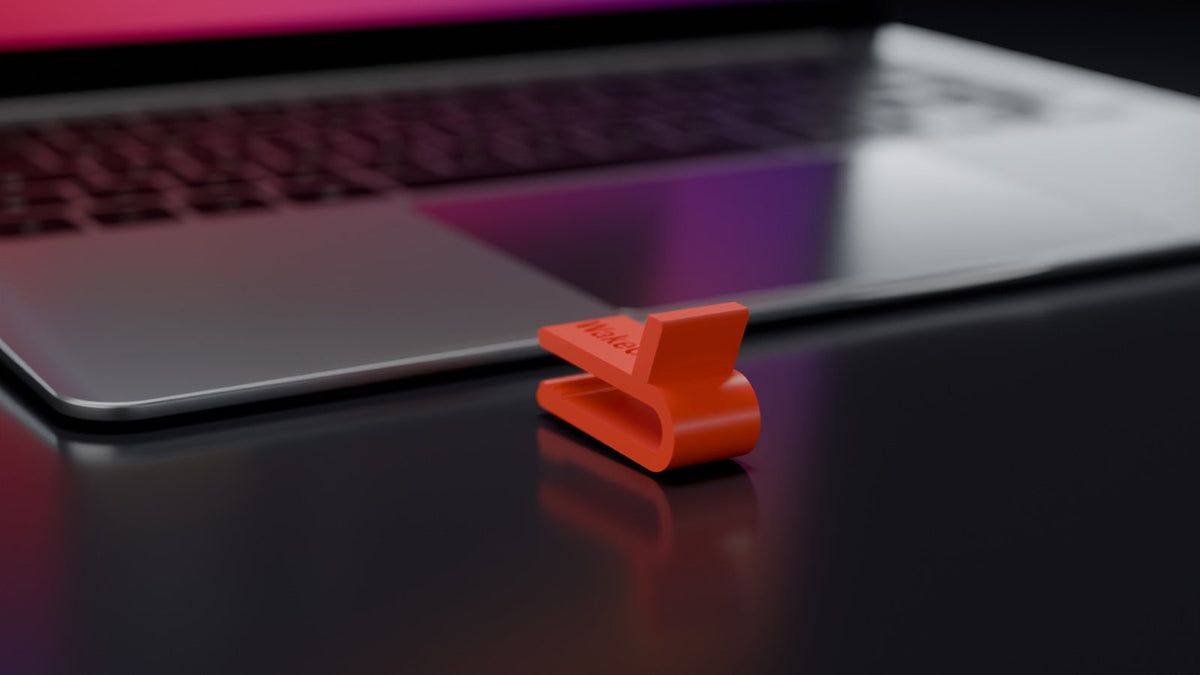
A MacBook without an external display always goes to sleep when you close the lid, and no normal setting prevents that. It only stays awake if a program changes system behaviour, if a display is connected, or if the lid never closes all the way.
This comparison names all seven ways, including the free ones. One is a lid spacer such as WakeClip, a clip that keeps the MacBook lid 12 mm open. It does not suit every situation, and this page says so.
What are the options, and what does each one do?
The table shows the seven ways and, for comparison, the open lid. Keep-awake apps count as one way, with two examples.
| Way | Prevents sleep from closing the lid | Installation or admin rights | Lid fully closed, heat | What you must undo afterwards | Good for |
|---|---|---|---|---|---|
| For comparison: leave the lid open and adjust settings | No. The lid has to stay open. | No | Lid open, heat can escape | The setting, if you changed it | A MacBook that stays on the desk, plugged in |
caffeinate in Terminal |
No. It only prevents idle sleep. | No, it is part of macOS | Lid has to stay open | Stop the command | Long tasks with the lid open |
| Keep-awake app: Amphetamine | Yes. According to its App Store page, you can choose in each session whether the Mac may sleep when the lid is closed. | Needs installation. On MacBooks with Apple silicon, the developer also offers an add-on, Power Protect, so that a closed-lid session keeps working when you plug in or unplug power. Power Protect needs admin rights to install. | Fully closed, no air above the keyboard | End the session in the menu bar if it does not end by itself | Your own Mac, where you may install apps |
| Keep-awake app: KeepingYouAwake | No. Its project page on GitHub says it only prevents sleep on a MacBook while the lid is open. | Needs installation | Lid has to stay open | Switch it off in the menu bar, unless you set a time limit | Long tasks with the lid open, as a menu bar switch for caffeinate
|
sudo pmset -a disablesleep 1 |
Yes, in practice sleep is switched off system-wide. The option is not listed in man pmset. |
Needs admin rights | Fully closed, no air above the keyboard |
sudo pmset -a disablesleep 0, otherwise the Mac stays awake in a bag too |
People who know Terminal and remember to reset it |
| External display, lid closed (clamshell mode), on power with keyboard and mouse | Yes, this is how Apple intends it | No, but you need the display, power adapter, keyboard and mouse | Fully closed, no air above the keyboard | Nothing | A fixed desk |
| HDMI dummy plug | Yes, it makes the Mac see a display | No, but you need the plug, the power adapter, a keyboard and a mouse | Fully closed, no air above the keyboard | Unplug it | A fixed spot without a real display |
| Lid spacer such as WakeClip | Yes, mechanically. The lid stops 12 mm before it closes. | No | Not fully closed, air stays above the keyboard and heat can escape | Take the clip off before you pack the MacBook away | Carrying from room to room, work Macs without admin rights |
| Cloud or a second computer | Not needed, the task does not run on the MacBook | Setup on the other machine | Either way, the MacBook may sleep | Nothing on the MacBook | Overnight runs and anything that should continue without you |
Other lid spacers exist besides WakeClip, and so do files for printing one yourself. WakeClip comes in 28 model-specific versions, delivered ready to use by a seller in Germany with a right of withdrawal.
Idle sleep is a different thing from sleep caused by closing the lid. The FAQ below covers it.
Which way suits whom?
You have a long Claude Code or Codex run and want to change rooms
A lid spacer fits well here. WakeClip keeps the lid 12 mm open. Your MacBook does not go to sleep from closing the lid, and whatever is running keeps running. You lower the lid and carry the MacBook in your hand, holding it by its base. An app such as Amphetamine also works if you are allowed to install it and want the lid fully closed. Either way, stay within Wi-Fi range. A lost connection can interrupt the task even if the Mac is awake. The guide Claude Code and MacBook sleep goes into more detail.
You use a work Mac without admin rights
pmset is out, and you often may not install apps. That leaves the open lid, an external display at your desk, and a lid spacer. The clip needs no installation, no Terminal command and nothing to reset later.
The job should run overnight
A server or a desktop computer is the better choice for this. If it has to be the MacBook, leave it open on the desk, plugged in, and prevent idle sleep with caffeinate -i or in the settings. You do not need a clip for that.
The MacBook goes into a bag
A working MacBook does not belong in a bag or sleeve. Take the clip off, close the MacBook normally and let it sleep. If you set disablesleep 1, reset it first with sudo pmset -a disablesleep 0. A task that must continue while you travel belongs in the cloud.
What are the limits of the clip?
- It is made for carrying in the hand, not for the bag. Pressure on the resting lid strains the display.
- Do not force it on, do not press the lid shut, and do not put anything on the lid.
- It only prevents sleep from closing the lid. Idle sleep is still controlled by the Mac's settings or the running program.
- It does not replace a cloud setup for tasks that should run without you.
- It costs €34.90.
caffeinateis part of macOS.
Frequently asked questions
Does caffeinate keep a MacBook awake with the lid closed?
No. caffeinate prevents idle sleep, not sleep from closing the lid.
Does clamshell mode work without an external display?
No. In the user guides for MacBook Air and MacBook Pro, Apple describes working with the lid closed when an external display and accessories such as a keyboard and mouse are connected. Without a display, closing the lid puts a MacBook to sleep. It then only stays awake if a system change such as sudo pmset -a disablesleep 1 or an app switches that sleep off, if an HDMI dummy plug makes the Mac see a display, or if the lid never closes all the way, for example with a lid spacer such as WakeClip.
Does the display stay on with a lid spacer?
The display does not turn off from closing the lid, because the lid stays open. Whether it turns off by itself after a while depends on your Mac's display setting.
Do I still need software with the clip?
Not for the lid. For idle sleep, the running program often takes care of it. If it does not, caffeinate -i or the matching setting on the power adapter is enough.
If a lid spacer suits you, choose the WakeClip for your MacBook model. The guide Keep a MacBook running with the lid closed explains the ways without an external display one by one. WakeClip is an independent accessory and is not affiliated with Apple, Anthropic or OpenAI.